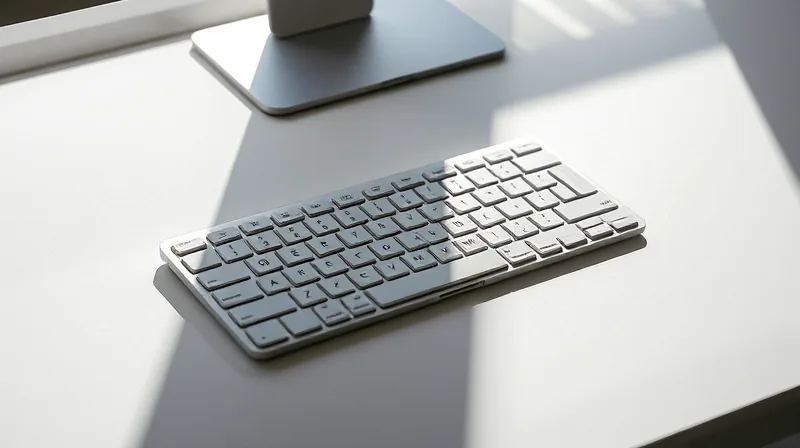
OpenAI Micro Promises AI Mastery Delivers Cute Paperweight
The white box sits on the desk, immaculate and sleek. It could be an Apple product from a decade ago, before the company traded clean lines for camera bumps. The anticipation is manufactured by design — the packaging itself whispers promises of effortless productivity. Inside is the Micro, OpenAI’s first piece of hardware, a compact keypad engineered, as the company put it, to pair with ChatGPT, the chatbot that has remade office life. But the moment you lift the device, you feel the deception. It is sturdy, dense, heavy enough to hold a door open. That sturdiness is the first clue that this is not a tool for work. It is a totem.
The Unboxing of an Expectation
Work Louder, the boutique keyboard maker that collaborated on the Micro, knows how to make a device feel premium. The frosted keys, the clean white housing, the tactile click of each button — every detail suggests that someone thought deeply about the user’s experience. But the experience they designed is one of discovery, not utility. The first time you plug it in, nothing happens. You need to open ChatGPT, find the Micro tab, and start mapping functions. The colors are not self-explanatory: white means the agent is idle, blue means thinking, green means task complete, red means error. There is no instruction sheet, only a wall of settings. This is the deception of the premium accessory: it sells you the feeling of being a power user before you have done any work. You begin to believe that with enough customization, this device will transform your relationship with AI. In reality, you are spending hours memorizing which key triggers which project, while your laptop’s keyboard sits idle, capable of doing everything the Micro can do with a keyboard shortcut you already know.
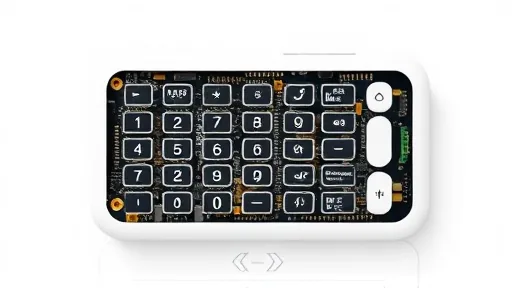
The Micro offers six so-called agent keys at the top, and six command keys below. You can assign ChatGPT sessions to them, toggle between projects, hold down the dictation button and speak your request. The idea is that you stop typing and start commanding. But the human voice is slower than a well-placed shortcut. The deception is that this device saves time, when in fact it adds a new layer of configuration. You must learn the color language, remember which project lives on which key, and decide whether to use Bluetooth or the USB cable. The device itself is fun to hold, the buttons satisfying to press. But that satisfaction is a reward for learning, not for producing. It is a game disguised as a productivity tool.
The Audience That Never Arrived
Hardcore coders, the intended buyers, have not embraced the Micro. On Reddit, users called it a prank, a real product only in the sense that a joke can be packaged and sold. One commenter noted that serious developers would not touch it, because real coding workflows already have high-efficiency shortcuts, customizable layers, and mechanical keyboards that cost less than half the price. The independent outlet Aftermath titled its review: “OpenAI’s expensive macropad feels engineered to piss me off specifically.” That anger is a reaction to the deception. People who spend their days in terminals recognize a gadget that solves a problem nobody had. The Micro costs $230 —according to OpenAI’s store page. For that money, you could buy a high-end mechanical keyboard with a fully programmable macro pad built in, or a Stream Deck that works with any software, not just one company’s chatbot.
The deception goes deeper than price. The Micro is not a general-purpose tool. It is a keypad that works with ChatGPT and the agentic coding tool Codex. If your workflow involves other AI models, or no AI at all, the device is dead weight. Yet OpenAI’s marketing, and the packaging, imply that this is a step toward a future where AI is woven into every keystroke. That future may come, but the Micro is not it. It is a prototype sold as a product, a beta test dressed in white plastic. The user is left to discover that the learning curve is not the path to mastery, but the toll for a novelty they did not ask for.
The Legal Theatre as Distraction
The Micro’s launch was overshadowed by drama. Weeks earlier, speculation emerged about tensions between Apple and OpenAI, though no lawsuit has been filed. The lawsuit is still unfolding, but it creates an interesting backdrop. Here is a hardware product from a company that is being sued by the most successful hardware company in the world. And there are rumors of another smart home device in development at OpenAI, built by former Apple engineers. The narrative becomes tangled. Is the Micro a genuine attempt to enter hardware, or a diversion? The deception might be that OpenAI is trying to look like a hardware company while their core business — the AI models themselves — remains controversial and legally contested. The device becomes a prop in a larger performance.
This is not the first time a tech company has released a questionable gadget while facing bigger problems. In the early 2000s, some companies released voice recognition hardware. Most of those devices ended up in drawers. The pattern repeats: a new technology emerges, and hardware makers rush to exploit it, creating products that serve the hype more than the user. The Micro fits this pattern perfectly. It is not a bad device — it is well-constructed, the buttons feel good, the dictation works — but it asks you to reorganize your workflow around a single company’s ecosystem. That is a steep price for a gadget that may not exist in two years. The company’s hardware ambitions could easily shift. The deception is that this feels like a permanent addition to your desk, when it is more like a limited-edition collectible.
The Historical Echo of Unnecessary Inputs
There is a long history of dedicated input devices that promised to change the way we work. The Stream Deck succeeded because it works with dozens of applications and is endlessly customizable. The Microsoft Surface Dial failed because it required specific software support. The Touch Bar on MacBooks is now remembered as a costly experiment that added complexity without utility. The Micro sits somewhere in that graveyard of ambition. It tries to solve a problem that most office workers do not have: how to quickly switch between ChatGPT project sessions. But the problem is self-made. Without the Micro, you simply open a new tab. With the Micro, you must learn a new interface.
The deception lies in the framing. When you see the demo videos of someone holding down the dictation button and saying “write an email to the client” while the Micro lights up and a response appears on screen, you believe you are watching efficiency. But you are watching a performance. The person in the demo has already programmed the key, memorized the colors, and knows exactly which project the agent key triggers. The actual user, sitting down with the device for the first time, spends minutes configuring, then forgets which key is which. The voice dictation is the most convenient feature, but even that requires holding a physical button and pressing send. On a laptop, a hotkey can do the same thing without taking your hands off the keyboard. The deceptive promise is that this device integrates AI into your workflow. In truth, it integrates you into the device’s workflow.
The Paperweight Paradigm
After spending a week with the Micro, the manual explained the color codes and the project assignments eventually stick. The device becomes usable. But the question that lingers is not whether it works, but whether it should exist. The Micro is a solution in search of a problem, dressed in premium materials. The packaging, the lawsuit, the rumors of bigger hardware — all of it creates a story that the device itself cannot fulfill. You buy into the story because the box is beautiful, because the buttons click satisfyingly, because the promise of effortless AI integration is seductive.
But at the end of the day, the Micro sits on the desk like a paperweight. The source reported that it is sturdy enough to double as one. That image is the most honest thing about the device. It is a weight that holds down papers, a conversation starter for tech enthusiasts, a symbol of the moment when AI was supposed to make everything easy and instead required a hardware accessory to make sense of itself. The deception is not malicious; it is structural. OpenAI built a product that works, but only within a narrow, artificial context. Real work does not happen inside a single chatbot session. Real work is messy, multi-tabbed, multi-tooled. The Micro is a clean white keypad for a clean white fantasy of AI-driven productivity. And like many fantasies, it collapses the moment you try to live in it.